Many RBAC (Role-Based Access Control) implementations differ, but the basics are widely adopted since it simulates real-life role (job) assignments. - Onur Yıldırım.
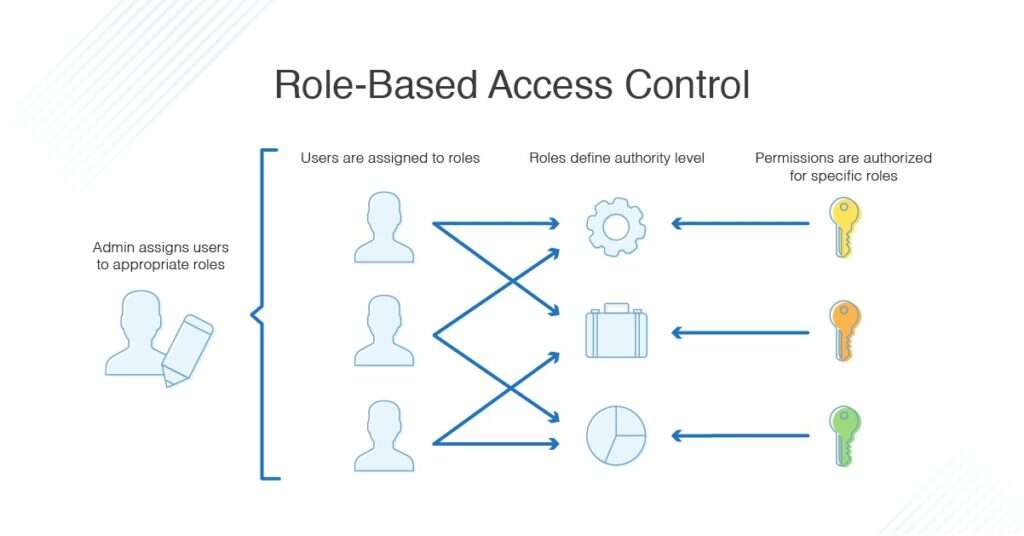
Role-based access control (RBAC) is a method of modifying access and privileges based on the roles of individual users or user groups within an organization.
RBAC lets members of an organization have access, to only the resources they need to do their jobs and restricts or prevents unlimited privileges to resources that don't pertain to them.

RBAC vs ABAC
Role-based access control and attribute-based access control (ABAC) are both types of access control methods, but their approaches are different. A use case that necessitates an RBAC system, would be if we intend to grant privileges on the application depending on the roles of users.
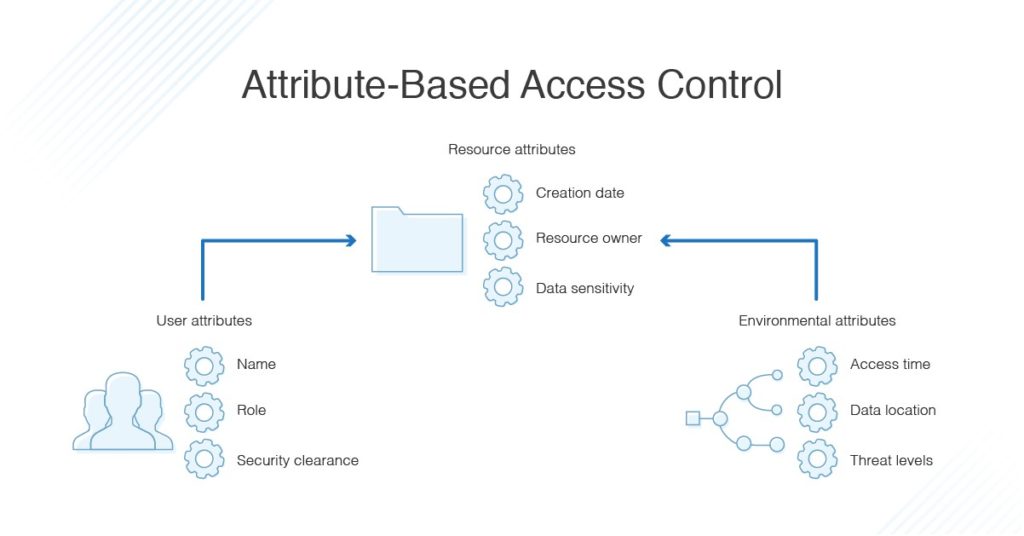
While ABAC grants access based on a combination of attributes, i.e., user attributes, resource attributes, attributes associated with the system or application to be accessed, environmental attributes, and so on. For example, User attributes may include biodata information, uniquely identifies, role, security clearance, and etc.
Back Story
On a recent project, my team was tasked with implementing a custom Role-based access control framework for MongoDB(NoSQL DB), using the mongoose ORM schema. In this access control framework we'll be considering 3 entities :
- Roles
- User
- Resources
Implementation context
- The User has a Role
- The Application has defined Resources and,
- The role has privileges & permissions to Resources
let's write some mongoose schema's for our collections 😄
Schema
resources.models.js
/* RBAC - role-based access control
 first create roles; role =[ "user", "guest", "organization",  "superadmin" "globalsuperadmin"]
 next, create resouuce, add their roles_id and permmissions
 finally create users and indcate thier roles
*/

    const mongooseClient = app.get('mongooseClient');
    const { Schema } = mongooseClient;

    const resources = new Schema({
      name: { type: String, required: true },
      slug: { type: String, required: true },
      resources_roles: [{
        roles_id: { type: Schema.Types.ObjectId, ref : 'Roles' },
        roles_name: { type:  String },
        create: { type: Boolean },
        delete: { type: Boolean },
        update: { type: Boolean },
        read: { type: Boolean },
      }]
    }, {
      timestamps: true
    });

    return mongooseClient.model('resources', resources);
roles.models.js
   const mongooseClient = app.get('mongooseClient');
    const { Schema } = mongooseClient;

  module.exports = function (app) {
    const mongooseClient = app.get('mongooseClient');
    const { Schema } = mongooseClient;
    const roles = new Schema({
      name: { type: String, required: true },
      slug: { type: String, required: true },
    }, {
      timestamps: true
    });

    return mongooseClient.model('roles', roles);
  };
users.models.js
 const mongooseClient = app.get('mongooseClient');
    const { Schema } = mongooseClient;


  module.exports = function (app) {
    const mongooseClient = app.get('mongooseClient');
    const { Schema } = mongooseClient
    const users = new mongooseClient.Schema({
      email: {type: String, unique: true, lowercase: true},
      password: { type: String },
      first_name: { type: String },
      last_name: { type: String },
      roles: { type: Schema.Types.ObjectId, ref : 'Roles' },

    }, {
      timestamps: true
    });

    return mongooseClient.model('users', users);
  };
Now when you want the permissions of a role on a resource, you just look up role_id and resource_id and check for which permissions are set to true in the resources collection.
Authorization Middleware
users.post('/', getAuth, someMethod)
Assuming you have a token of some sort on the request that identifies the user making the post, and attaching the user instance to the request object you can do this:
// pseudo code
getAuth = function (req, res, next) {
  if(req.user) {

// query to get the user role's  permissions for a resource
    if(token){
    // handle jwt token authenticity and decrypt payload

   // get permission handler
    db.getPerms({ role_id: req.user.role_id, resource_id: req.resource.id})
    .then((perms) => {
       var allow = false;
       // mapping of methods to permissions
       perms.forEach(function(perm){
           if (req.method == "POST" && perms.create) allow = true;
           else if (req.method == "GET" && perms.read) allow = true;
           else if (req.method == "PUT" && perms.write) allow = true;
           else if (req.method == "DELETE" && perm.delete) allow = true;

       })
       if (allow) next();
       else {
            res.status(403).send({error: 'access denied'});
        }
    })
    .catch((err)=> {
       //handle your reject and catch here
    })
} else{
    res.status(400).send({error: 'invalid token'})
}
This is some Pseudo-code, showing how the authentication middleware can be written.
This isn't the most optimized framework for implementing RBAC, so I'm looking forward to your feedback 😄!!
Thanks for the audience and I hope you found this article helpful 🤗. Feel free to reach out to me on Github, Twitter and LinkedIn. Do drop a like, comment, and share 😌.
About the author
SWE | Avid learner | Technical director @repotecc | open-source contributor | Web enthusiast | Community lead @DscOui and developer advocate
Comments
Join the discussionHi, thanks for helpful article. I'm really wondering how can we get the resource_id in the middleware to get the right permissions?
Thanks for reading my blog Bashko Ali! While this is just a boilerplate for RBAC needs. To get the resource_id in the middleware, you can either add it to the request object or extract it from the request URL.
Adding it to the request object would involve modifying the routing code to pass the resource_id to the middleware.
Extracting it from the request URL would involve parsing the URL and extracting the resource_id from it. You can also improve this and share.
Awesome article