Setup Social Authentication In Django Rest Framework

With the Global surge in internet users, as well as people embracing and gaining access to digital products, It's become the goal of many applications to bring the best user experience and retain many guest users. Social Authentication aims at simplifying the login process for visitors, thus leading to a higher conversion rate on user registrations.
Some advantages include:
Faster registration
One login credentials less to remember
less failed login attempts.
Easier mobile experience.
The user experience can be more personalized and directed.
And the list goes on.
Backstory
I recently needed to implement social login API's for Google and Facebook social providers. I had a lot of attempts to get it working and talking with the client application, but it proved challenging 😧 .
Alas we got the Social Auth API's communicating with the client application 😊 and in this tutorial I will show you how to easily implement Facebook social login.
Assumptions. The reader has some experience with Python, Django Rest Framework and API's.
Integrating social Authentication to the server-side of an application requires:
A selected social authentication provider
A log-in request to the social authentication provider
An authentication token from login, so as to access protected API routes.
Before getting started,
Head to Facebook developers page
Create a social App
On the dashboard, settings >> basic, add ‘app domain’ and ‘site url’ which can be any url and remember to set the URL in the
/etc/hostsfile in your local machine.Copy the FACEBOOK_APP_ID and the FACEBOOK_APP_SECRET and set them as environment variables in your project’s .env file.
All set, let's configure our Django application;
In this project we'll be working with the django-rest-auth library. The package aims to simplify registration and authentication tasks, by providing a set of REST API endpoints .
1.) Install django-rest-auth package:
pip install django-rest-auth
2.) Add rest_auth app to INSTALLED_APPS in your django settings.py:
INSTALLED_APPS = (
    ...,
    'rest_framework',
    'rest_framework.authtoken',
    ...,
    'rest_auth'
)
3.) Add rest_auth urls:
urlpatterns = [
    ...,
    path('api/<version>/rest-auth/', include('rest_auth.urls'))
]
4.) We need to install the django-allauth package as well, because we need to enable a standard registration process.
pip install django-allauth
5.) Add django.contrib.sites, allauth, allauth.account and rest_auth.registration apps to INSTALLED_APPS in your django settings.py:
INSTALLED_APPS = (
    ...,
    'django.contrib.sites',
    'allauth',
    'allauth.account',
    'rest_auth.registration',
)
6.) Add SITE_ID = 1 to your django settings.py
SITE_ID = 1
7.) Add rest_auth.registration urls:
urlpatterns = [
    ...,
    path('api/<version>/rest-auth/', include('rest_auth.urls')),
    path('api/<version>/rest-auth/registration/', include('rest_auth.registration.urls'))
]
8.) Add allauth.socialaccount and allauth.socialaccount.providers.facebook or allauth.socialaccount.providers.twitter apps to INSTALLED_APPS in your django settings.py:
INSTALLED_APPS = (
    ...,
    'rest_framework',
    'rest_framework.authtoken',
    'rest_auth'
    ...,
    'django.contrib.sites',
    'allauth',
    'allauth.account',
    'rest_auth.registration',
    ...,
    'allauth.socialaccount',
    'allauth.socialaccount.providers.facebook'

)
9.) Add Social Application in Django admin panel
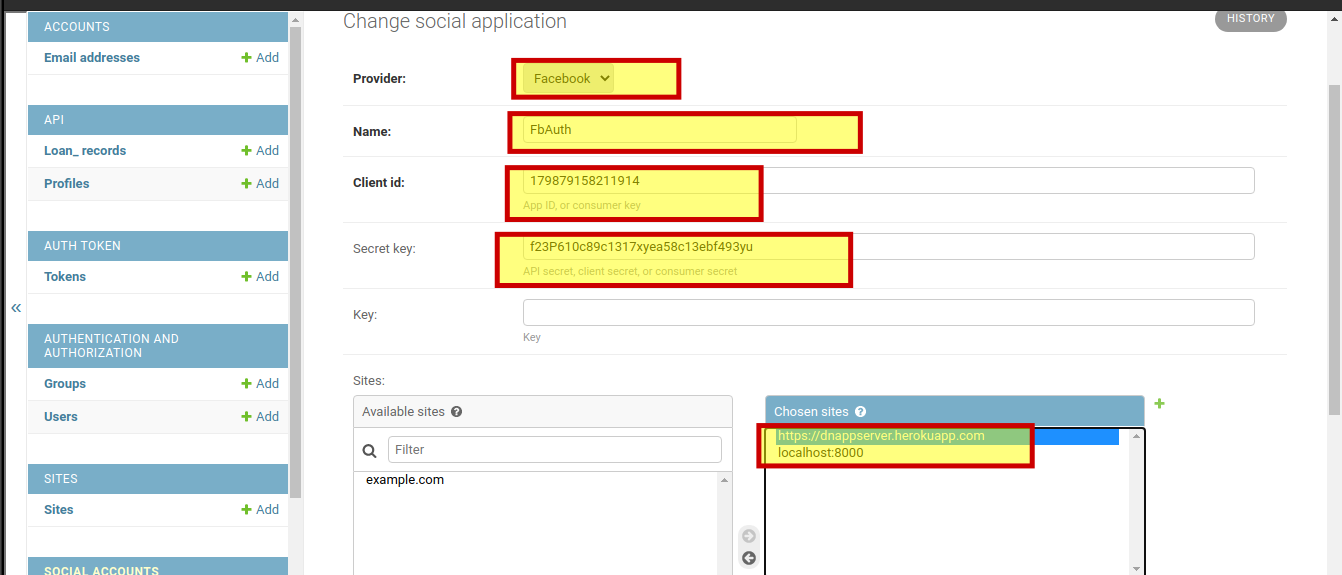
10.) Create a new view as a subclass of rest_auth.registration.views.SocialLoginView:
from allauth.socialaccount.providers.facebook.views import FacebookOAuth2Adapter
from rest_auth.registration.views import SocialLoginView

class FacebookLogin(SocialLoginView):
    adapter_class = FacebookOAuth2Adapter
11.) Create URL for FacebookLogin view:
urlpatterns += [

    path('api/<version>/rest-auth/facebook/', FacebookLogin.as_view(), name='fb_login'),
]
Let's test the API without any Authentication token and get the appropriate response:
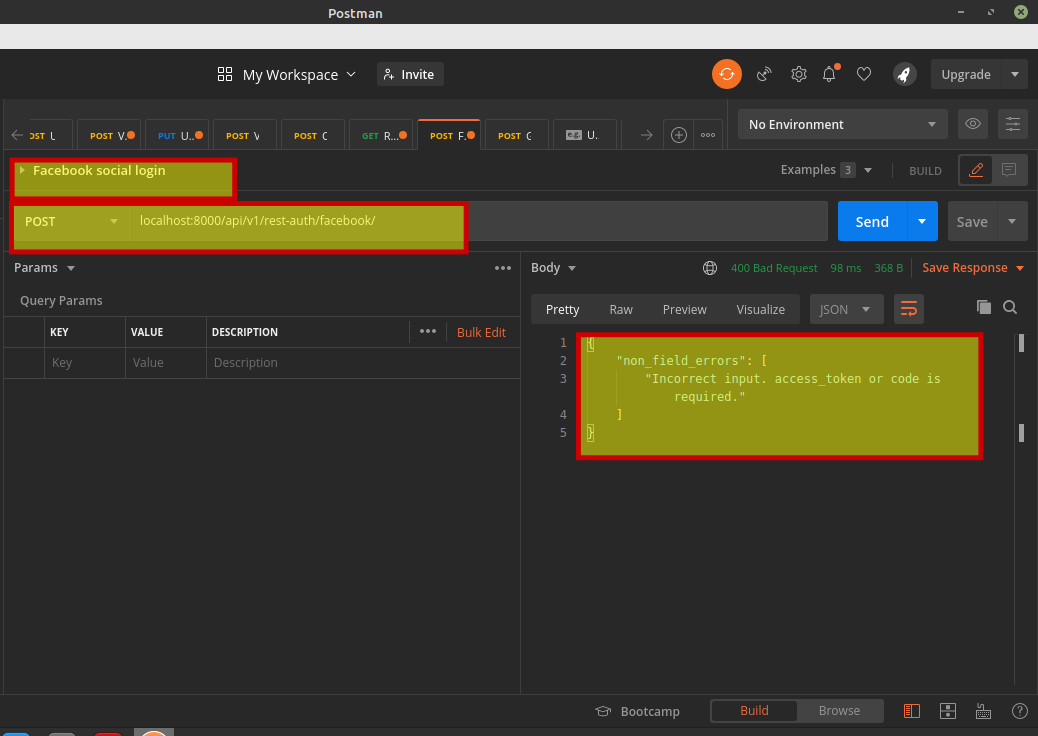
TaDa!!! The backend social Auth configuration is ready for communication with the client application.
Hopefully, you can improve the user experience of your applications by supporting more social Authentication providers 🤓.
Thanks for the audience 🤗. Connect with me on Github, linkedIn && Twitter.