
Capture a bad response, turn it into a regression case, and check how the verdict is decided.
Imagine a support assistant promising an instant refund, even though the policy requires manager approval and three to five business days for processing. That’s a response worth keeping as a test. 🤔
I wanted to keep a bad response as a test I could rerun after changing the application. LLMCheck is my Python project for capturing model calls, reviewing failures, and turning them into regression cases.
Let’s capture that response, edit the generated test criteria, run a new response through the test, and inspect the verdict together. 🧪 We’ll also try answers that could fool the checker. Those checks exposed a draft-generation defect and showed that low confidence does not prevent a passing result.
The walkthrough uses LLMCheck code with a made-up refund policy and scripted responses. It runs offline. Later, we compare a literal string checker with a recorded OpenAI evaluation of twelve examples from that policy.
The judge is the model or function that checks an answer against the case’s criteria. We will inspect its explanation and reported problems alongside each verdict.
You can inspect the refund-policy cases in the explorer or run the current refund-policy example. The optional setup below reproduces the older implementation used in this walkthrough, including the defect discussed later.
What LLMCheck Actually Is 🔍
LLMCheck connects four operations: capture a call, review its output, save an approved case, and run the application against that case again. It stores captured records in SQLite and regression criteria in YAML. At the source revision used here, the instrumentation wraps the synchronous client.chat.completions.create(...) interface.
LLMCheck checks response text. You still need application tests to confirm that a database transaction committed, an advert was updated, or an external service accepted an action. It also does not provide production tracing or wrappers for every provider’s SDK.
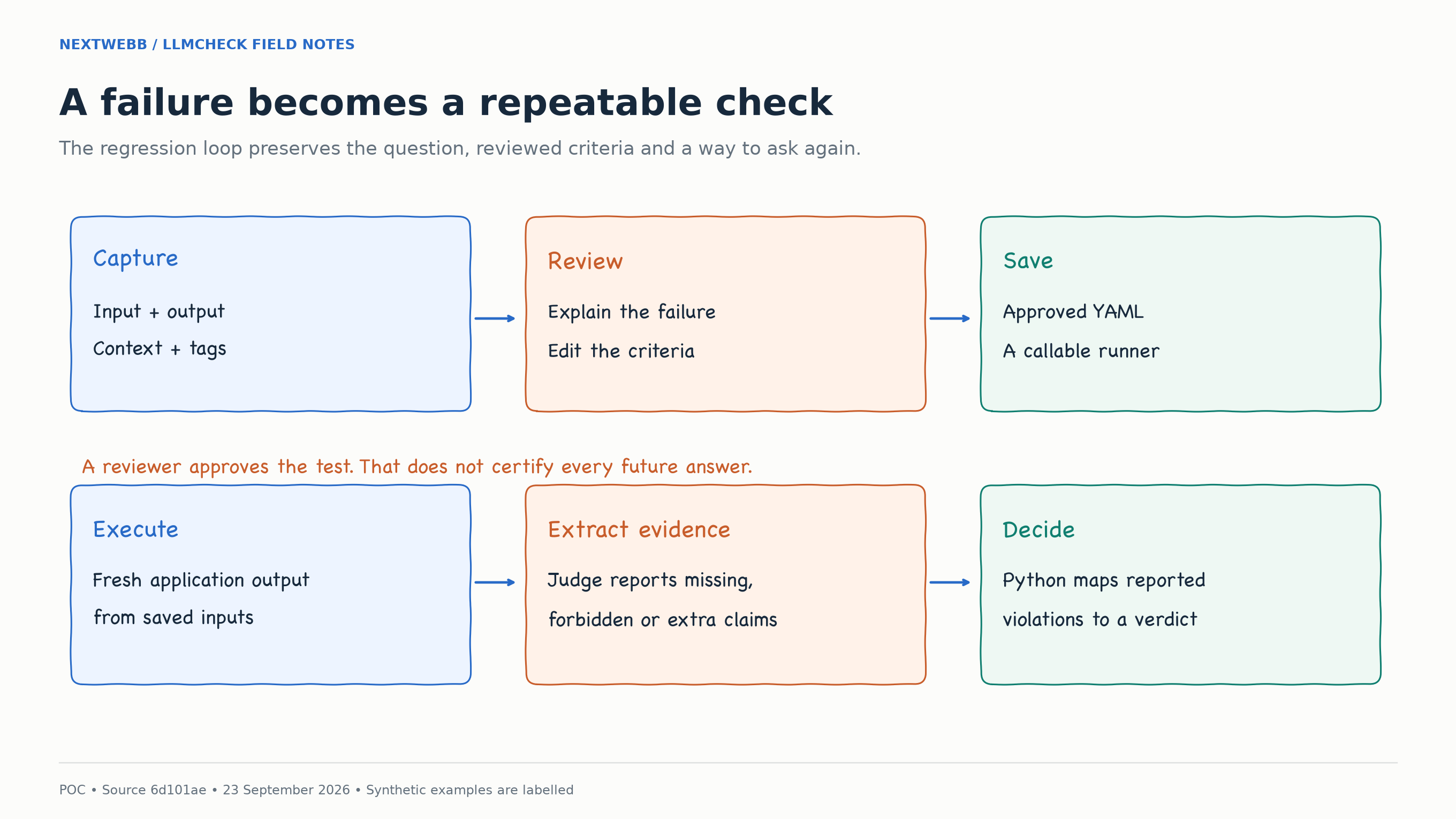
Review the case, run the application, and inspect the judge’s reported violations. Python uses those violations to calculate the verdict.
The default judge receives the new output, approved context, and expected criteria, then returns lists of violations. Python passes the case when those lists are empty. A judge that misses a problem can therefore produce a false pass. We will look at that code below.
The repository also has an experimental feature for reusing reviewed knowledge in later calls. We will cover it after the regression walkthrough.
The offline walkthrough and its original figures use source commit 6d101ae90781b8dc06965f57313445f8878cf6d6, version 0.3.0. Inspect the historical source alongside the demo scripts. The release update and recorded live evaluation below cover later work. Use the pinned commit to reproduce the original examples, including the defect.
Release update: what changed after the walkthrough
The core is licensed under Apache 2.0. PR #3, merged as 70a6fde, fixes the draft-generation defect examined below and hardens capture, dashboard rendering and installation. The merged revision passed 58 tests in the checkout and extracted source archive, with CI passing on Python 3.10, 3.11 and 3.12.
The earlier 0.4.0 candidate, ce91167, passed 53 local tests. In the fixed generator, correction text stays in the rubric; reviewers fill in the required and forbidden phrase lists.
Open the case explorer to switch between the literal fixture and the recorded OpenAI run. Clicks display saved evidence and do not call a provider. Inspect the archived experiment scripts to reproduce the original 0.3.0 walkthrough, including its historical defect. The live run used the modified candidate before it was committed: its base Git revision and exact judge/script hashes are preserved in the release evidence.
Why This Problem Matters to Me 💭
I worked on a publishing data platform, operating and extending recommendation workflows across 37 configured production publishing sites.
That work included historical and incremental processing. Processing an existing dataset can follow a different path from handling the changes that arrive afterward, so both paths need validation. The Airflow work involved diagnostic runs, investigation with the engineering team, and recorded validation results.
I want the same details available when investigating a model response: the input, the environment, what we expected, and what happened.
I also worked on advertising systems, including Python agent workflows connected to Google Ads operations and backend APIs. An agent response was only one part of the request path. Context, credentials, database access, service boundaries, and returned data all influenced what happened next.
In those systems, checking the answer text alone would miss problems elsewhere in the request. The application might supply incomplete information to the model, or take an inefficient path to produce a reasonable answer. Investigating the response means checking those surrounding steps too.
Those projects inform how I approach testing. LLMCheck is an independent project, and the examples below use synthetic data.
Prerequisites and What We Will Run 🧰
To reproduce this walkthrough, you need Python 3.10 or later, Git and PyYAML. We will use two pinned checkouts: one containing the original experiment scripts, and one containing the 0.3.0 library used in the figures. For a first run with the current tool, use the refund-policy example linked above.
For the offline walkthrough, you do not need an OpenAI API key or the OpenAI Python package. The offline_demo.py script constructs a small object with the same chat-completions shape used by the wrapper. Its response is predetermined. An injected judge then checks predetermined strings.
We’ll start with fixed responses so we can test capture, storage, review and replay without making model requests. 💻 Then we’ll check where the literal judge gets the policy wrong.
Let’s get the example ready. Clone the public source into a fresh directory: 🛠️
git clone https://github.com/nextwebb/llmcheck.git
cd llmcheck
git checkout --detach 986a3118c4c4f6f35d995bb89a8479e32fef0925
git worktree add --detach ../llmcheck-article-0.3.0 6d101ae90781b8dc06965f57313445f8878cf6d6
python3 -m venv .venv
source .venv/bin/activate
python -m pip install 'PyYAML>=6.0'

LLMCHECK_SOURCE="$PWD/../llmcheck-article-0.3.0"
LLMCHECK_EXAMPLES="$PWD/examples/article"
LLMCHECK_OUTPUT="$(mktemp -d)"
The demo script’s --repo argument adds the checkout's src directory to Python's import path, so an editable package installation is not needed for that route.
To use the historical CLI and dashboard shown later, install that worktree in this environment:
python -m pip install -e "$LLMCHECK_SOURCE"
llmcheck --help
The archived example directory contains three main scripts: offline_demo.py runs the example, smoke_test.py checks it, and inspect_results.py prints the saved results. Its evidence directory contains the twelve-answer experiment and confidence checks. These scripts call the LLMCheck library.
Run the following commands in the same terminal so the path variables remain available. LLMCHECK_OUTPUT is a fresh temporary directory; each new run needs an empty directory because the demo refuses to overwrite earlier results.
If you already know the implementation, skip ahead to the twelve-case experiment, confidence, and draft-polarity sections for the checker’s failure cases. 📌
1. Define a Failure Before Writing a Detector 📝
Our teaching policy has two required facts: refunds above $100 need manager approval, and processing takes three to five business days. The question is whether a $150 refund can arrive today. The scripted bad answer is Your refund is instant.
The response has three problems: it omits approval, omits the processing window, and promises an immediate refund. A policy this small lets us check each problem directly.
Write those three requirements into the case. Instructions such as “be accurate” or “do not hallucinate” leave the reviewer to work out what counts as a correct answer each time.
Searching for instant can help you select runs for inspection, but it will also flag “The refund is not instant.” The reviewer or judge still needs to decide whether the response violates the policy.
The demo script flags this scripted failure directly. Later, we try substring matching as the judge and see which answers it gets wrong.
Let’s keep the first case small enough to inspect by hand: 📝
Question: Can I get a $150 refund today?
Policy: Approval required; processing takes 3-5 business days.
Observed response: Your refund is instant.
Failure: Missing required facts and an unsupported timing promise.
Save the question and policy with the response so the next person reviewing it can check the failure against the same requirements.
2. Capture the Response Without Hiding the Test Double 📥
The following excerpt shows the shape of the offline client. The full runnable version is in examples/article/offline_demo.py.
from types import SimpleNamespace

class SyntheticCompletions:
    def create(self, **kwargs):
        return SimpleNamespace(
            choices=[SimpleNamespace(
                message=SimpleNamespace(
                    content="Your refund is instant."
                )
            )]
        )

client = SimpleNamespace(
    chat=SimpleNamespace(completions=SyntheticCompletions())
)
We will wrap this local client with LLMCheck’s instrumentation. This test double returns no token-usage metadata. The recorded latency measures its local function call.
Attach the wrapper and the context you want stored with the call:
from pathlib import Path
from llmcheck import instrument_openai, add_context, add_tags, flag

client = instrument_openai(
    client,
    storage_path=Path("demo-output/fixture.db"),
)

add_context([{
    "id": "synthetic-policy",
    "text": "Refunds above $100 require manager approval "
            "and take 3-5 business days.",
}])
add_tags({
    "workflow": "SYNTHETIC-POC-DEMO",
    "source": "scripted provider; no live model",
})
add_context saves material alongside the next captured call. To give that policy to the model, your application must also include it in the request. Finding a policy in the captured context does not tell you whether the application sent it.
The demo script calls the client and flags the result. The wrapper saves the messages, user input, output, context, tags and available metadata in SQLite after the call succeeds. It captures completion calls, not the rest of the application.
LLMCheck’s optional approved-knowledge feature can prepend system messages before a call. Our fresh demo workspace has no approved knowledge entries. If you enable that feature in an existing workspace, check the stored entries when investigating changes to a request.
3. Run the Offline Demo and Inspect the Results 🧪
Run the demo using the paths set above:
python "$LLMCHECK_EXAMPLES/offline_demo.py" \
  --repo "$LLMCHECK_SOURCE" \
  --output "$LLMCHECK_OUTPUT"
The command generates the captured record, draft, reviewed case, suite and results using LLMCheck’s wrapper, storage, generator, runner and parser. The script performs the review edit so each run produces the same case.
Start with three files:
| File | What to check |
|---|---|
captured-run.json |
The saved question, policy and authored bad answer belong to the same run. |
capture-cli.txt |
The CLI view agrees with the saved record. |
provenance.json |
The source revision and execution mode match the experiment you intended. |
Inspect the saved CLI display and JSON:
cat "$LLMCHECK_OUTPUT/capture-cli.txt"
python -m json.tool "$LLMCHECK_OUTPUT/captured-run.json"
Look for four things. The output should be the scripted instant-refund sentence. The context should contain the synthetic policy. The tags should identify the run as a demonstration. The flag reason should explain what was wrong, rather than merely say “bad output.”
provenance.json records the source commit and execution mode. IDs and timestamps can change between runs, but the four verdicts should stay the same because the responses and injected judge are fixed.
Run the separate smoke check too:
python "$LLMCHECK_EXAMPLES/smoke_test.py" \
  --repo "$LLMCHECK_SOURCE"
It creates an isolated temporary run and checks capture, review artifacts, expected outcomes, and overwrite refusal. The tests do not open your normal application database. The demo also blocks the Python TCP connection entry points it uses as an accidental-network-call guard. That guard is not an operating-system sandbox for arbitrary untrusted code.
4. Review the Generated YAML as a Specification 📋
Before we approve the generated YAML, let’s read it as a test specification. 📋 Does it describe what a correct future answer must say? A correction written for one bad answer can make a poor test for other answers.
In this revision, the generator places the correction text into must_include and extracts double-quoted phrases into must_not_claim. Review both lists: this rule can misinterpret your feedback, as we will see in the draft-polarity example.
The demo’s scripted review replaces the broad correction with separate requirements:
expected:
  must_include:
    - manager approval
    - 3-5 business days
  must_not_claim:
    - instant
judge:
  type: rubric
  pass_if: >-
    Require manager approval and 3-5 business days;
    do not claim "instant".
This is an excerpt from the reviewed case, not a complete suite file. The demo script also saves identifiers, inputs, context, and metadata. Keeping the generated draft and reviewed version separately lets you see what the script changed.
The offline judge searches for these exact substrings. The default model judge receives the same fields in its prompt, together with the context and rubric, and interprets their meaning.
When reviewing a case, allow correct ways to express the policy. A correct paraphrase may omit the exact phrase manager approval while still saying that a manager must approve the refund. Conversely, a sentence can include both required phrases and negate the policy. We will test both cases shortly.
In a separately configured application workspace, this command reviews the latest capture using that workspace’s llmcheck.yaml and llmcheck_suite.yaml:
llmcheck review --latest
The CLI offers approval, editing, or rejection. Saving valid YAML through the Edit option also approves the case and appends it to the suite; there is no second confirmation. The demo script has already performed its review in code, so you do not need this command to complete the walkthrough.
If an output starts failing, compare it with the policy before editing the case. You may need to fix the application, update the case for a policy change, or correct an expectation that was wrong from the start.
5. Understand What Replay Actually Executes 🔄
The suite identifies a Python function using a module-and-function path:
runner:
  type: python
  callable: fixture_app:answer_user
Here’s the small test application we’ll use to follow the replay: 🔄
OUTPUT = ""

def answer_user(query):
    return OUTPUT
For each scenario, the demo script changes OUTPUT, then invokes the real suite runner. The runner imports the configured function and calls it with the case's inputs as keyword arguments. It evaluates the returned output rather than regrading the archived capture.
In a real integration, that function would call your current application. It could run retrieval, construct messages, and invoke a model. Those operations are your runner's responsibility. The saved case does not automatically restore an old index, database snapshot, tool response, or complete conversation.
To connect your application, expose its answer through an adapter with the same keyword parameter:
# Illustrative adapter: replace this import with your application's API.
from my_app import generate_answer

def answer_user(query):
    return generate_answer(query)
Save it as application_adapter.py beside the suite and make your application package importable in that environment. Change the suite callable to application_adapter:answer_user. The saved case supplies query, so that parameter name must match. This example assumes a synchronous function returning answer text. The my_app import is a placeholder, and this integration pattern was not executed in the offline experiment.
Call your adapter directly with the case's question before running the suite. Inspect its returned text and verify that retrieval and external actions use a controlled test environment. A callable that works in your web server may depend on request state or credentials that the suite process does not have.
Replay reruns the function with the saved inputs. If its answer depends on a catalogue or policy version, your runner must load the version you intend to test.
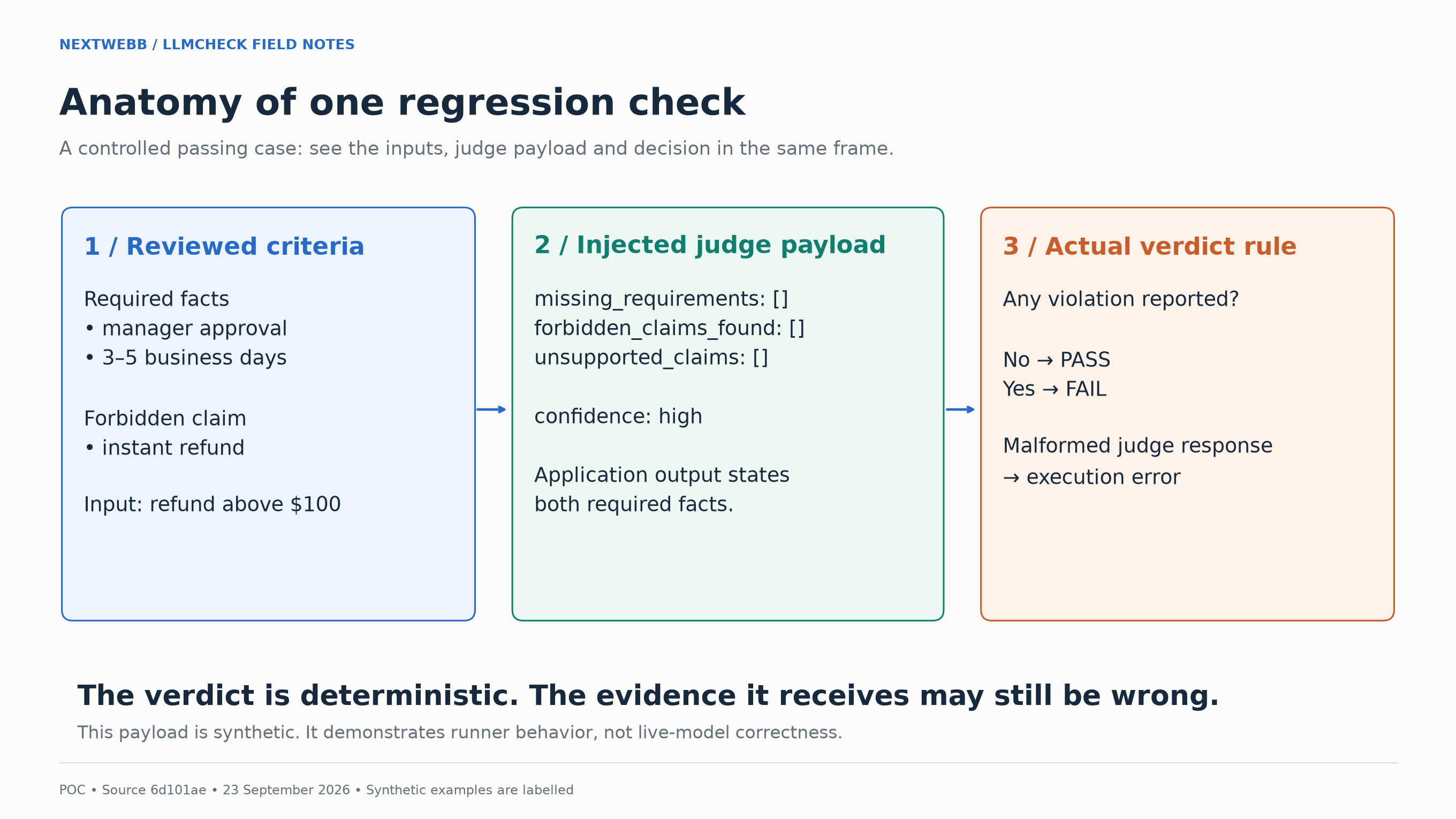
The scripted passing response produces empty violation lists. The runner uses those lists to return a pass.
The demo script runs four scenarios to check that responses reach the judge and produce the expected verdicts:
| Scripted response | Observed verdict | Why the injected judge returns it |
|---|---|---|
| Instant refund | Fail | Required phrases absent; forbidden phrase present |
| Policy stated directly | Pass | Required phrases present; forbidden phrase absent |
| Approval without timing | Fail | Processing window absent |
| Policy plus an instant promise | Fail | Forbidden phrase present |
You can inspect those decisions without opening the full JSON. Use inspect_results.py to print the saved verdicts:
python "$LLMCHECK_EXAMPLES/inspect_results.py" \
  "$LLMCHECK_OUTPUT/replay-results.json"
The demo run produces the following verdicts:
FAIL | Incorrect scripted response
  Missing: manager approval; 3-5 business days
  Forbidden: instant
  Reason: Synthetic fixture judge: literal matching only; no semantic grounding assessment.
PASS | Corrected scripted response
  Reason: Synthetic fixture judge: literal matching only; no semantic grounding assessment.
FAIL | Missing timing requirement
  Missing: 3-5 business days
  Reason: Synthetic fixture judge: literal matching only; no semantic grounding assessment.
FAIL | Contradictory promise
  Forbidden: instant
  Reason: Synthetic fixture judge: literal matching only; no semantic grounding assessment.
Stored synthetic results only; no application or judge was executed.
The reason is fixed across these scenarios; the missing and forbidden lists show why each case failed. This inspection command reads saved evidence; rerun offline_demo.py with a new output directory to execute the workflow again.
All four results matched the expected verdicts for these scripted responses. This checks the capture-to-replay path; the twelve-case experiment below tests where the literal judge breaks down.
6. Trace the Boundary Between Judge and Verdict 🔎
The default judge is asked to return a JSON object with three violation lists, a reason, and a confidence category:
{
  "missing_requirements": [],
  "forbidden_claims_found": [],
  "unsupported_claims": [],
  "reason": "The required facts are present.",
  "confidence": "high"
}
That object is an illustrative payload shape. In the offline demo, a test function supplies the JSON. In the default path, an OpenAI model supplies it. Both paths use the same response parser.
The parser requires lists of strings, a string explanation, and a confidence value of high, medium, or low. It rejects responses with missing fields or incorrect types.
The aggregation rule then asks whether any violation list is nonempty:
violations = (
    judge_result.missing_requirements
    or judge_result.forbidden_claims_found
    or judge_result.unsupported_claims
)
passed = not bool(violations)
A reported violation fails the case. Empty lists pass it. The suite passes when all its cases pass.
Here’s the catch. 🤔 If the judge overlooks a contradiction and returns empty lists, this rule still passes the case. The Python code does not check the policy again.
7. Case Study: Twelve Answers That Challenge the Demo Judge 🧩
The first four cases checked the workflow. I then used twelve cases to test how the literal judge handled paraphrases, negation, contradictions and extra promises. Each case had a policy label assigned before the run.
The policy for this experiment also rules out guaranteed approval and a promised cash bonus. The judge still checks two required substrings and one forbidden substring, and always returns an empty unsupported-claims list.
For now, we’re testing the injected literal judge. We’ll try the default model judge in section 12. 🧪
The categories were literal compliant answers, compliant paraphrases, compliant negations, missing required facts, contradictions containing the expected words, and unsupported extra promises. There were two cases in each category.
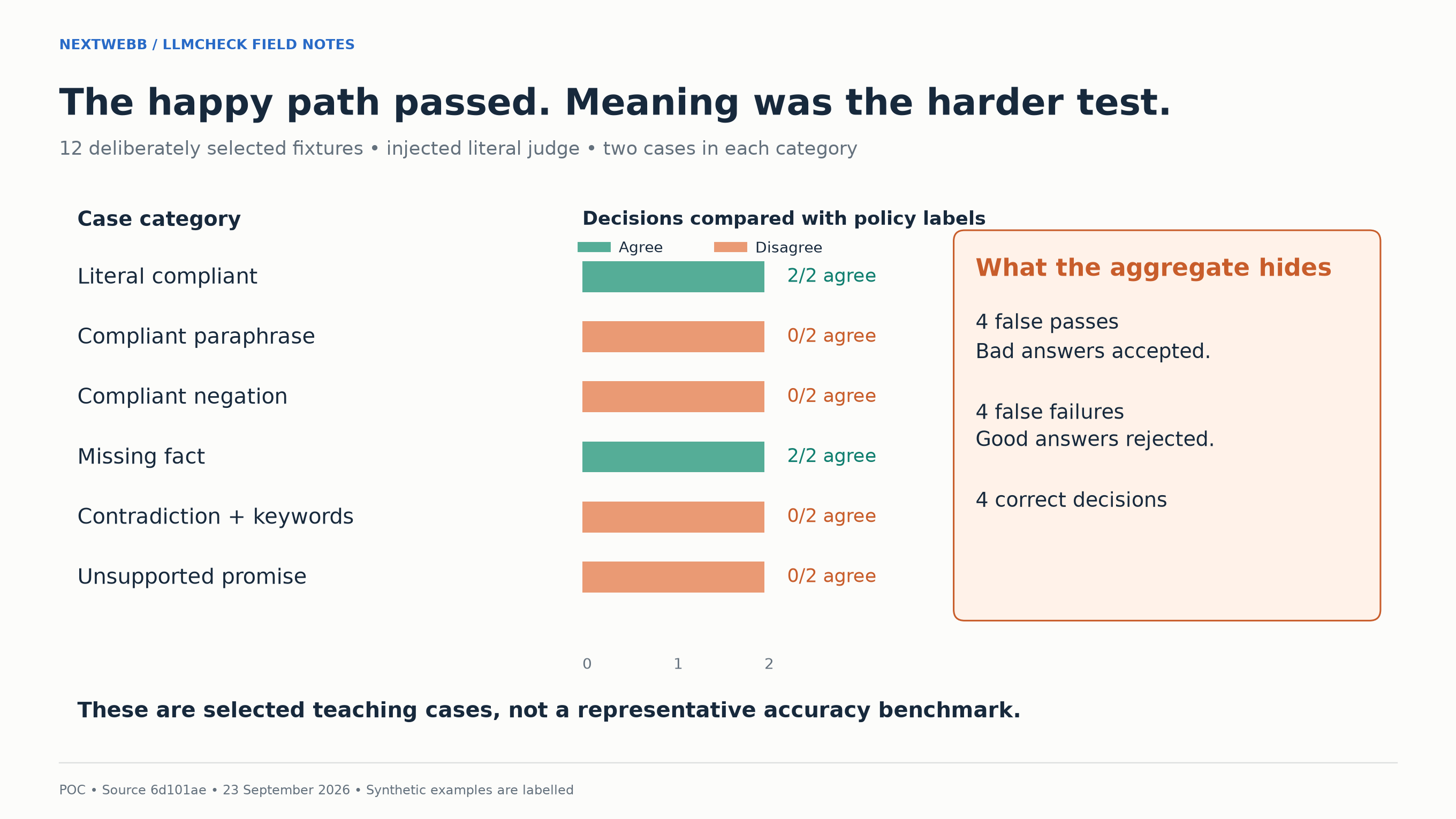
Four decisions agreed with the predefined labels and eight disagreed across these twelve selected cases.
Consider a paraphrase: “For a refund over $100, a manager must approve it, and processing takes three to five business days.” The policy meaning is preserved. The literal checker fails it because neither required phrase appears in the exact expected form.
Now consider negation: “Refunds above $100 require manager approval and take 3-5 business days. They are not instant.” The forbidden substring is present, so the checker fails a response that explicitly denies the prohibited promise.
A contradiction gets through: “Manager approval is not required for refunds above $100; processing takes 3-5 business days.” Both required strings appear, and the forbidden one does not. The checker passes a response that reverses the approval policy.
The judge also passes responses that state the required facts and then guarantee approval or promise a $25 cash bonus. Its unsupported-claims list is always empty, so neither promise affects the verdict.
The result is four false passes, four false failures, two correct passes, and two correct failures. The labels come from the refund policy defined for this experiment.
8. Case Study: A Low-Confidence Result Still Passes 🤔
What happens when the judge isn’t confident? 🤔 It returns a confidence field, but this revision does not use it to decide pass or fail.
The next probe passed four injected judge responses through the actual suite runner and parser. High confidence with empty violation arrays passed. Low confidence with empty arrays also passed. A reported violation failed. Malformed JSON produced an execution error.
In the reported-violation probe, the injected judge claimed a required phrase was missing even though the application output contained it. The case failed because the verdict logic uses the judge's violation lists without independently checking the answer.
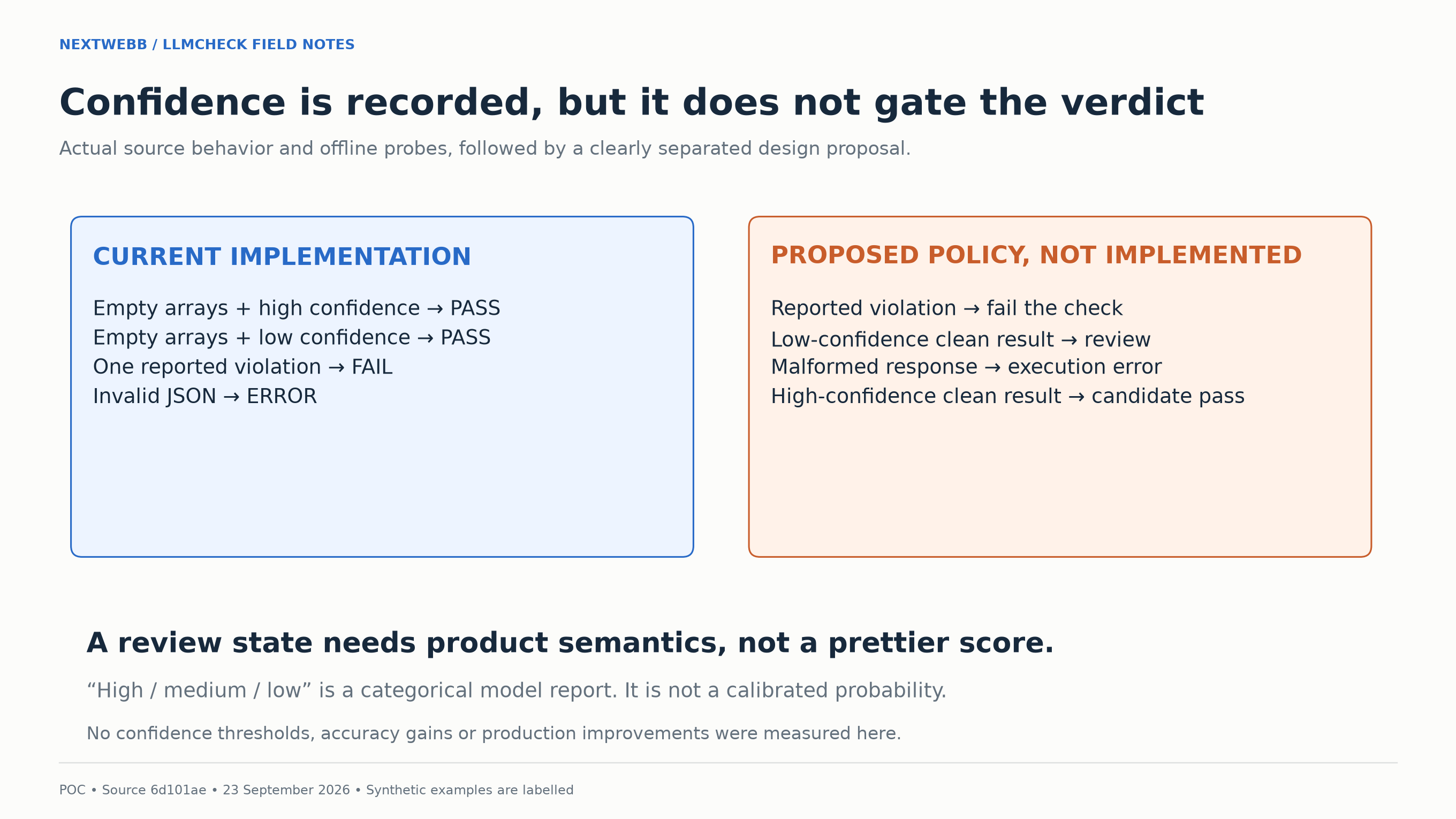
The left side shows the probe results. The right side shows a proposed review state, which is not implemented.
I would add a review state alongside pass, fail and error. That would let a low-confidence response wait for review even when its violation lists are empty.
The values high, medium, and low are labels, not measured probabilities. We have not checked whether this judge's high-confidence verdicts are more often correct than its low-confidence ones, so the labels alone cannot tell us how dependable that review rule would be.
9. Case Study: A Draft That Contradicts Its Correction ✏️
The 0.3.0 generator produced a contradictory draft from this correction. The merged implementation fixes the defect, but the old output shows why draft review matters:
Include "manager approval".
Now look at the generated criteria. 🔍 They included the full correction as a required entry and extracted the quoted phrase as forbidden:
expected:
  must_include:
    - Include "manager approval".
  must_not_claim:
    - manager approval
The draft requires manager approval while also forbidding it. The 0.3.0 extraction code treated double-quoted text as forbidden without checking whether the correction asked to include it.
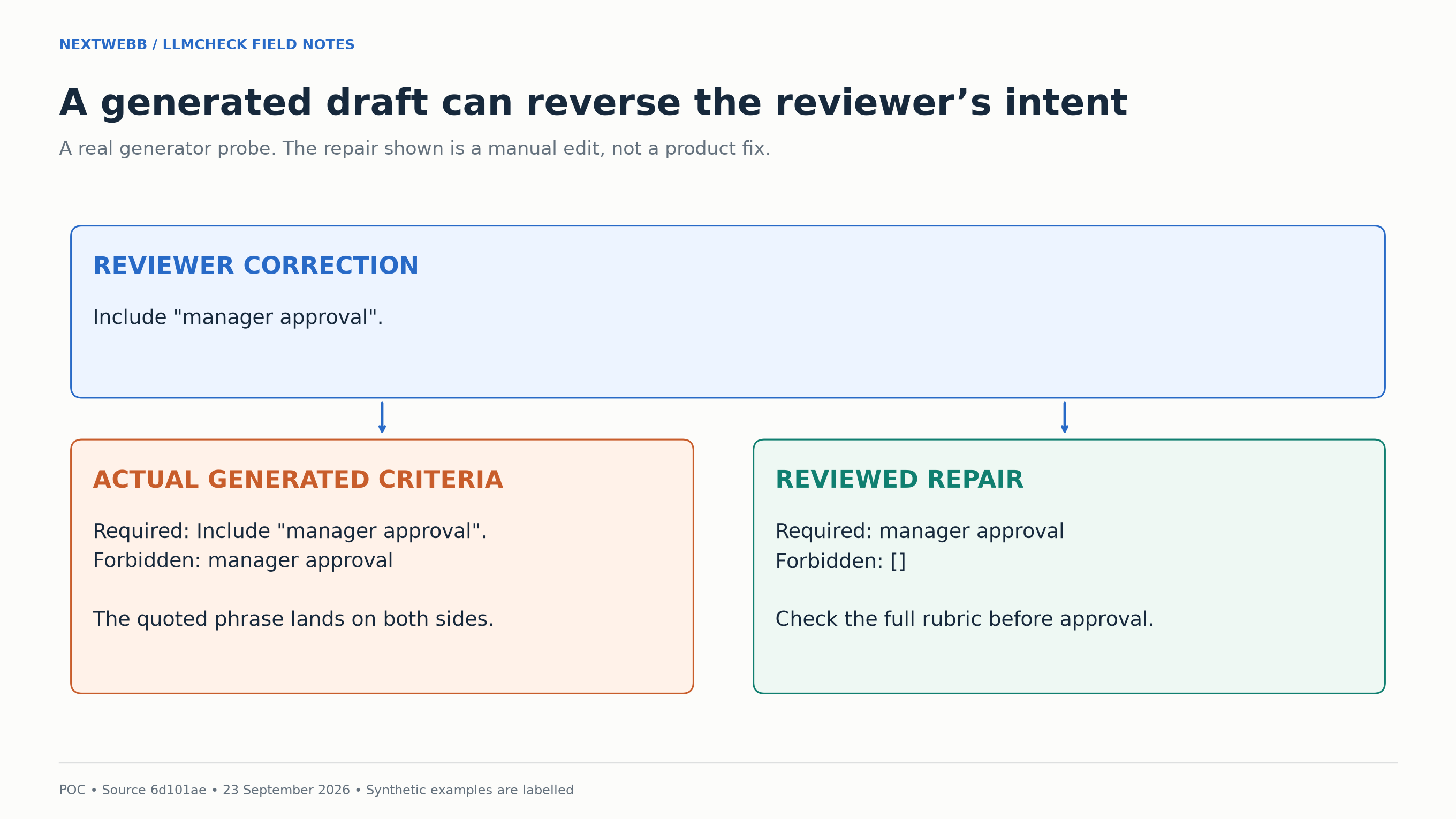
The synthetic record reproduced the 0.3.0 defect. The repaired criteria illustrate a manual edit; the merged code fix works differently, as described below.
Both lists are valid YAML, so the parser accepts them. A reviewer could repair this case by requiring manager approval, clearing the forbidden list, and checking that the rubric agrees with those changes.
The merged fix stops extracting forbidden claims from quotation marks. It keeps the correction in the rubric and leaves both phrase lists empty for the reviewer.
10. Keep the Application, Storage and Provider Boundaries Visible 🔐
LLMCheck stores records locally. Its default judge sends evaluation material to OpenAI, and your application runner may make its own external calls.
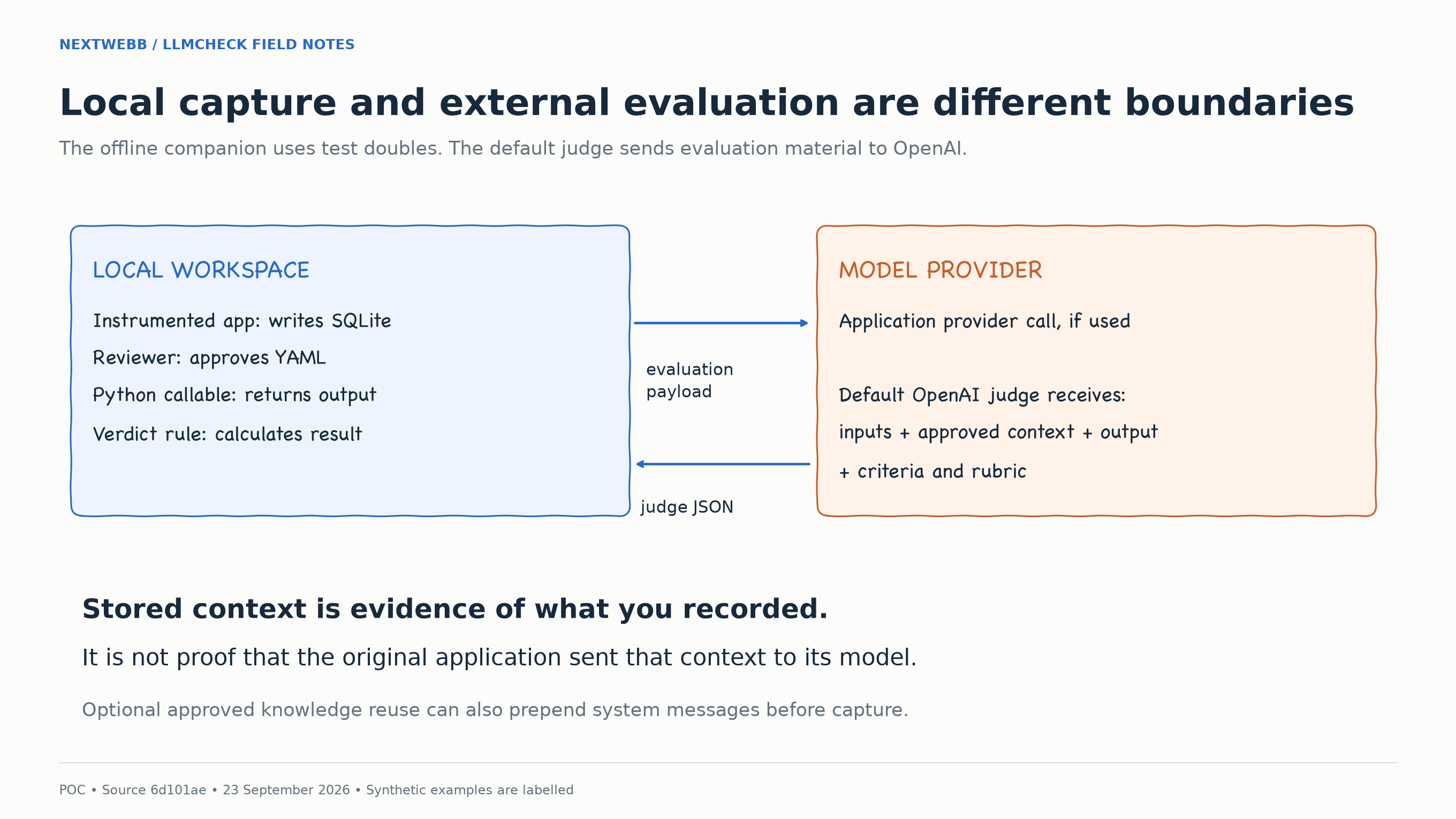
The offline demo supplies fixed responses. The normal judge path crosses the provider boundary with inputs, context, output, criteria and rubric.
For the refund case, the judge needs the policy and the answer. It does not need a customer credential or an unrelated internal note. Choose what to capture with the later evaluation request in mind.
Keep a stable identifier and policy version with the context, along with the application and judge configuration. If the approval threshold changes from $100, those records let you check whether a failure comes from the application or an outdated case.
Replay executes your Python function. If that function sends email, changes a campaign, or writes to production, replay can repeat those actions. Use a sandboxed application path or substitute those actions during development evaluations.
The suite names the module and function to execute, and the runner makes the suite directory available during import. Inspect that code before running a suite from an unfamiliar source.
11. Regression Cases and Reusable Knowledge Are Different Artifacts 📚
The repository also has an experimental workflow that turns reviewed information into knowledge entries for later requests.
A regression case replays an input and checks the answer against reviewed expectations. An approved knowledge entry can supply information to later application requests.
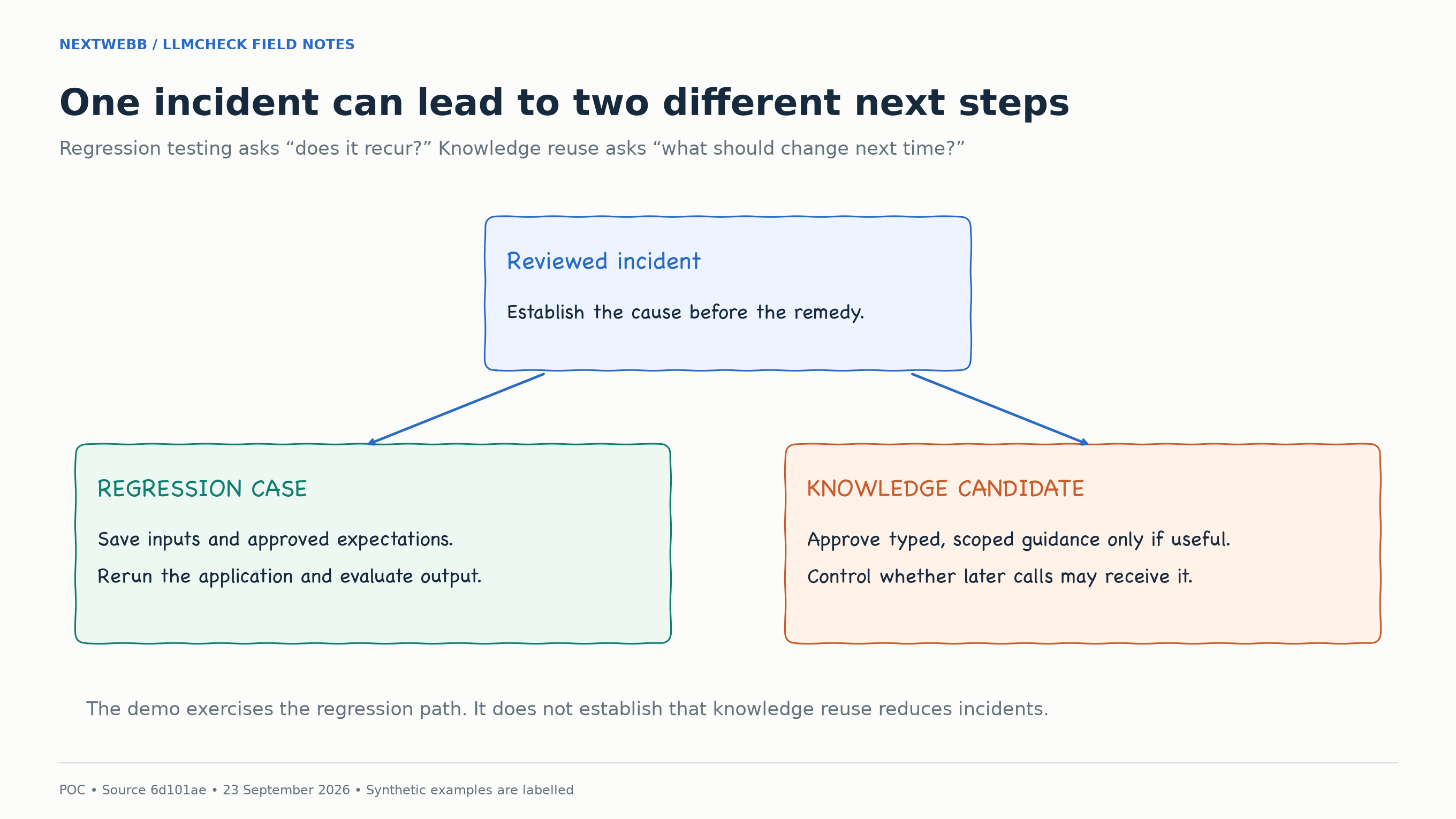
The pilot classifies failures by cause: missing context, wrong retrieval targets, reasoning failure despite sufficient context, prompt or instruction failures, workflow failures, ambiguity, and false-positive detectors.
An answer that contradicts a supplied refund policy may not improve when given another copy of that policy. Retrieving the wrong document calls for checking retrieval constraints. An ambiguous policy needs clarification before it becomes reusable guidance.
At this revision, matching uses workflow scope, usage mode, and token overlap rather than semantic search. Certain approved modes prepend planning guidance or runtime context as system messages before the original application messages. The run metadata records which entries were applied. Detection-only and review-assist modes do not inject knowledge.
After installing the historical CLI above, open the dashboard against the generated workspace:
llmcheck pilot-dashboard \
  -c "$LLMCHECK_OUTPUT/llmcheck.yaml" \
  --host 127.0.0.1 --port 8765
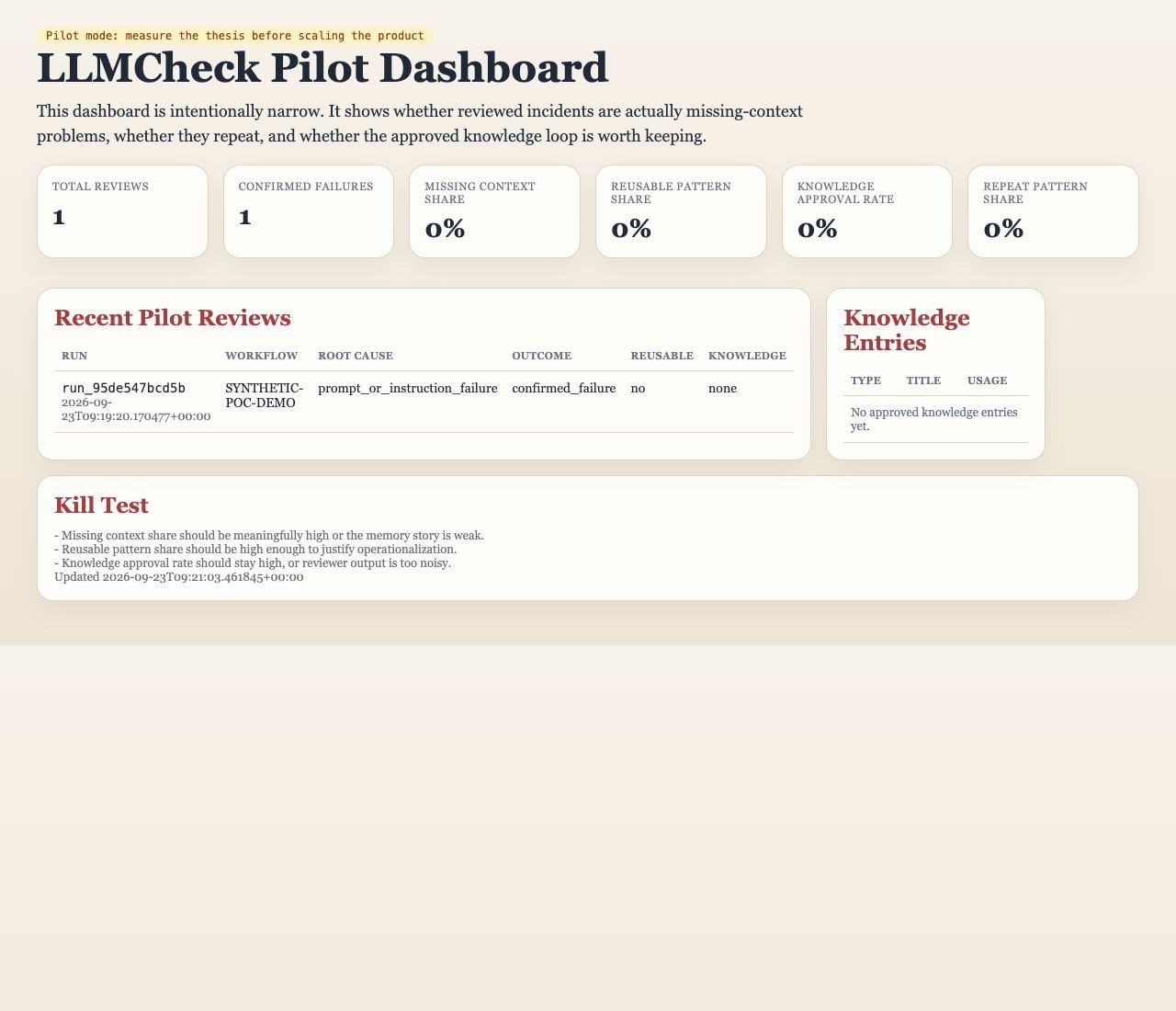
The dashboard from an earlier isolated run of the same synthetic demonstration at the pinned revision. Its run ID and timestamp differ from a new demo run. The review count and percentages come from fixture data.
The demo script supplies one synthetic review to inspect in the dashboard. I have not measured whether knowledge reuse reduces repeated failures. That would need repeated cases, a baseline without the reused knowledge, and a comparison of both corrected answers and new errors.
12. Move to a Live Judge as a Separate Experiment 🌐
On 23 September 2026, we ran a separate evaluation using the default OpenAI judge. The script sent the twelve refund-policy cases to gpt-4o-mini-2024-07-18, once each, with no retries. All twelve requests completed.
The recorded outcomes were five correct passes, six correct failures, zero false passes and one false failure. The rejected compliant response included the sentence “Do not expect an instant refund.” The judge reported the negated phrase as forbidden. The saved run includes that false failure.
The public explorer shows each saved response in its Recorded OpenAI run mode. Clicking through those results does not repeat the evaluation, and the server needs no provider key. These selected examples show how this configuration handled the refund policy; they are too narrow to estimate accuracy on other tasks.
To use the live judge with your application, both 0.3.0 and the merged implementation require an OpenAI API key with access to the configured judge model. This is separate from the offline walkthrough. The environment above has the 0.3.0 CLI installed; these commands do not upgrade it. Follow the repository installation instructions in a separate environment to use the current implementation.
Set OPENAI_API_KEY in the environment used to run the suite. Keep the key out of case files and source code. Set judge.model in llmcheck.yaml to choose the model; the configuration defaults to gpt-4o-mini when that field is omitted.
Before using the CLI, prepare a configuration with a real judge.model and a suite pointing to your application adapter from section 5. The offline demo uses unused-in-fixture-demo as its model name, and its saved fixture function starts with an empty response. Adding an API key does not turn those files into a live application test.
With your configuration saved as llmcheck.yaml and your suite as llmcheck_suite.yaml, run:
llmcheck run-suite -c llmcheck.yaml --suite llmcheck_suite.yaml
This command calls OpenAI through the default judge, even when your application function returns a fixed string. The offline demo supplies its own judge through the Python API; the CLI has no equivalent offline switch.
For a follow-up, I would add cases that were not used to adjust the prompt, covering paraphrases, negation, unsupported additions and contradictions. The twelve cases and their authored labels stayed fixed during this run.
Save the judge model, prompt version, case-set version, source commit, full payload and returned JSON so you can compare runs. Repeating requests under the same configuration would show whether the verdicts vary. The source uses temperature zero, which does not guarantee identical remote responses.
Keep false passes and false failures separate. In this run, the one disagreement rejected a compliant answer. A false pass on “manager approval is not required” would have a different consequence: accepting an answer that reverses the policy.
Latency, token usage and cost were not measured in this run. The judge transport returns response content without token-usage data. To compare costs or timings, instrument those values separately and use the same case set for each configuration.
13. Make the CI Contract Explicit ⚙️
The CLI returns zero when all cases pass, one when at least one case fails, and two for caught configuration or suite-execution errors. Code two covers handled import, runner and judge failures; uncaught exceptions are not universally mapped to it.
A case that fails because the answer promises an instant refund needs an application or expectation review. A missing module or malformed judge response needs an execution fix. Both may block a release, but the saved error should tell you which problem to investigate.
Parser and aggregation tests use controlled inputs, so they can run on every change without a provider call. Choose when to run the live judge based on its cost and how often the application or evaluation criteria change.
Review cases before adding them to a release gate. “Refunds are instant” and “Do not expect an instant refund” contain the same forbidden word, but test different meanings, so keep both. Repeated copies of the same promise add less coverage. When the policy changes, update the affected expectations and record why.
Save the application output, judge payload, reason and configuration for failures. Those files let you see whether the judge rejected a negation or found an actual promise.
Something didn’t behave as expected? Here’s where to start looking for the failures we covered: 🧰
| Observation | Inspect next | Next action |
|---|---|---|
| Stored policy was ignored | messages and context in captured-run.json |
Check whether the application actually sent the policy. Recording context does not insert it into the prompt. |
| A case seems impossible to satisfy | generated-draft.yaml and reviewed-case.yaml |
Look for a phrase required and forbidden at once. Review both the lists and rubric. |
| A paraphrase fails or a contradiction passes | Judge implementation and replay-results.json |
Check whether this was the literal fixture judge. Preserve the counterexample before changing criteria. |
| Low confidence still passes | Violation arrays and confidence |
Empty arrays explain the current verdict. A review state would require a separate policy change. |
| Replay errors before a verdict | Callable path, input names and reported error | Separate an import or runner failure from a malformed judge response. Neither is evidence that the answer violated policy. |
| The demo refuses a second run | --output directory |
Choose a new empty directory to preserve the earlier evidence. |
14. What Passed, What Failed, and What Remains Open 📌
The offline run saved the capture, generated and revised the case, and executed the four replay scenarios. All four verdicts matched their expected results. The separate smoke test also confirmed that a second run cannot overwrite the first run’s output directory.
The pinned 0.3.0 run passed 21 tests with provider fakes or mocks. The merged hardening revision passed 58 tests. Separately, the twelve OpenAI requests agreed with eleven authored labels and rejected one compliant answer containing a negation. The unit tests and model evaluation check different behavior.
Wrapping Up 😊
Start with the complete negation case when you try a different judge. Its answer includes the required approval and timing facts, followed by “Do not expect an instant refund.” The recorded judge rejected that compliant answer. Keep it alongside a response that actually promises an instant refund, and inspect the reasons for both verdicts.
Your turn. 😊 Add a failure from your own application, write down the expected behavior, and check it again after your next change. 🧪
Source: github.com/nextwebb/llmcheck. To try the current tool, run the refund-policy example. It captures a scripted response, saves a reviewed case and prints the replay results.
Have feedback or a case you want to discuss? Leave a comment 💬 or reach me on GitHub, Twitter/X, or LinkedIn. If this helped, give it a thumbs up 👍 and share it with someone testing their own LLM application.
About the author
SWE | Avid learner | Technical director @repotecc | open-source contributor | Web enthusiast | Community lead @DscOui and developer advocate
Comments
Join the discussionStructured outputs beat clever prose for agent steps. I pin a JSON shape for every tool result and reject freeform when the next step needs a field. That one rule cuts half my retry loops.